
Microsoft MFA: Security Keys (yubikey, FIDO2)
This article will discuss what a security key (USB) is, how they can be used for Microsoft MFA authentication, and how to purchase them
Table of Contents
- What should I purchase and where?
- How do I set it up?
- How do I use my Security Key?
- Will the University buy my key?
- Can I use it with other services?
Security Keys are physical authentication devices that can be used for secure login to various online services and systems. They are small, USB-based keys that can be plugged into a computer or mobile device to verify a user's identity. When tapped, they submit a one-time code to the service being accessed. Traditionally, these devices also use a pin or biometric reader to ensure the individual's identity. Additionally, these keys offer the added ability to go passwordless with your login. They are non transferable to other employees once configured.
What should I purchase and where can I get it?
The Service Desk recommends and supports YubiKeys manufactured by Yubico. Of these, the most economical are the Security Key Series.They can also be purchased in person at the USU Campus Store, in the Tech section. Remember you'll need to ensure the correct form factor (outlet/port) when purchasing that will work with the device intended. Models come in both Standard USB-A and USB-C formats. Should you chose another key brand, be sure the key you purchase indicates it is "FIDO2" compatible.
I have my key, how do I set it up?
- Ensure you are using a compatible browser (Chrome is recommended). Microsoft does not yet support Firefox, Safari, Opera, or other browsers for use with security keys!
- You must first set up an authentication method, such as a phone number or the Microsoft Authenticator application (see davistech.edu/mfa). Then, proceed to add a security key as an additional option.
- Visit aka.ms/mfasetup and log in.
- Click:+ Add sign-in method
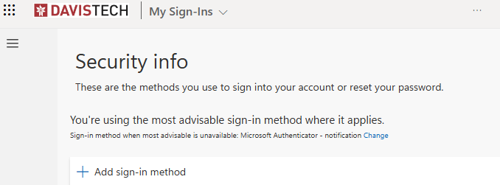
- Choose "Security key" and click Add
- Select USB device and follow the on screen instructions:
- insert your key into a USB port
- click next->
- tap your security key (ignore QR code should it appear) ->
- create a PIN ->
- tap your security key again ->
- name your key
Will the university pay for my key?
Davis Technical College does not purchase keys for employees or students unless you have made other arrangements in your particular department or unit. Please note that security keys are not transferrable by the Service Desk to another person once set up.
Can I this security key with other services, personal or professional?
Yes. However, the Service Desk only supports Davis Technical College accounts .